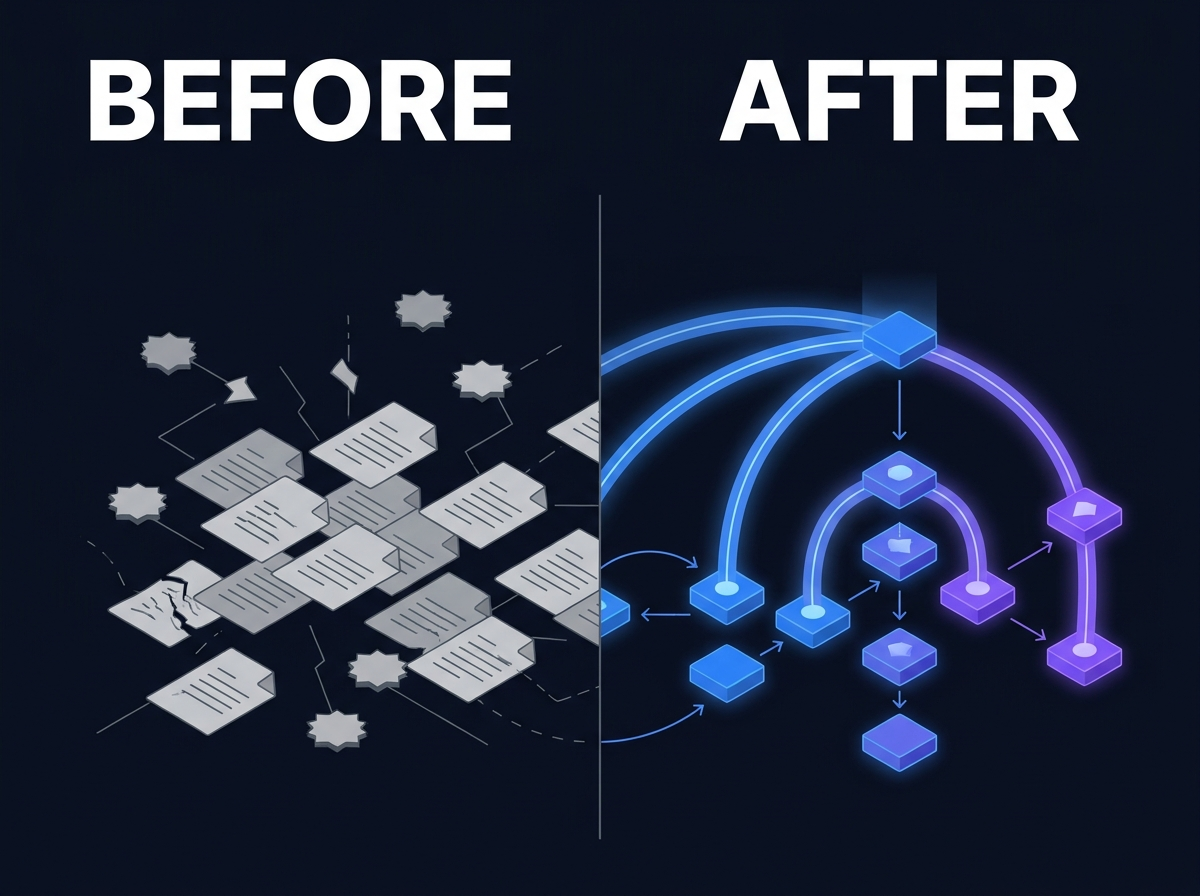
Why Organizations Need More Than File Storage
lightbulb Executive Summary
File storage solves retention and basic sharing. It does not solve findability, rights governance, lifecycle control, or cross-system discovery. As content volume grows, organizations accumulate search debt: files exist everywhere but authorized users cannot trust what they find. Digital Asset Management, Knowledge Management, and Enterprise Search are capability layers above storage, not expensive folder upgrades. Media, scanned documents, and project archives stay opaque to search when storage is the only strategy. Private AI requires governed corpora with permission-aware retrieval. Storage alone cannot support that foundation.
Executive Summary
- File storage solves retention and basic sharing. It does not solve findability, rights governance, lifecycle control, or cross-system discovery.
- As content volume grows, organizations accumulate search debt: files exist everywhere but authorized users cannot trust what they find.
- Digital Asset Management, Knowledge Management, and Enterprise Search are capability layers above storage, not expensive folder upgrades.
- Media, scanned documents, and project archives stay opaque to search when storage is the only strategy.
- Private AI requires governed corpora with permission-aware retrieval. Storage alone cannot support that foundation.
1. Introduction
The storage renewal went through on time. Capacity doubled. Backup jobs completed. Finance saw predictable cost per terabyte. Six months later, teams still ask the same question in every meeting: where is the latest version?
This is the gap between storage and enterprise knowledge operations. Organizations invest in NAS, cloud file shares, and collaboration platforms because content must live somewhere. Retention, replication, and access control at the folder level are real requirements. The business case for storage is straightforward.
What storage does not provide is a reliable answer to harder questions: Which copy is approved? Who owns this record? Can we legally use this asset in that channel? How does a user in another department find it without calling three people?
Those questions appear when document volume, media libraries, regulatory expectations, and cross-team reuse outgrow folder habits. IT keeps storage healthy. Knowledge work slows anyway.
Leadership often misreads the symptom. Teams ask for more storage, another SharePoint site, or a sync tool with a cleaner interface. Those requests are real. They rarely address findability, rights, or cross-system discovery. The organization buys capacity when it needs capability.
This article explains why enterprise file storage hits predictable limits, what capability layers sit above storage, and how organizations extend what they already have without a rip-and-replace migration.
2. Problem Definition
What file storage is designed to do
File storage, whether on network shares, object storage, or collaboration sites, is built to persist bytes and grant access at path or library level. It handles replication, backup, quotas, and basic versioning in some products.
Storage answers:
1. Where does the file live? 2. Who can open this folder? 3. Is there enough capacity for next quarter?
Those are infrastructure questions. They matter. They are not the full knowledge problem.
What storage does not solve
When organizations treat storage as the complete content strategy, four gaps persist:
Findability. Folder names reflect whoever created them. Search across shares, Teams libraries, email attachments, and DAM exports returns duplicates, obsolete drafts, and filenames that made sense to one project team years ago.
Governance. Retention rules, approval states, rights metadata, and lifecycle ownership require structure beyond ACLs on directories. Storage holds files. It rarely holds enforceable context about how those files may be used.
Cross-system discovery. Work happens across PLM, CRM exports, ticket attachments, media servers, and collaboration platforms. Storage in one system does not help a user who lives in another.
Format intelligence. Video without transcripts, scans without OCR, and design files without descriptive metadata are stored correctly and discovered poorly.
Collaboration platforms are still storage at the core
SharePoint, Teams libraries, Google Drive, and Box solve sharing and co-editing well. They remain path-oriented repositories at the infrastructure layer. Sites multiply. Libraries fork per project. Permissions inherit in ways business users do not track.
Search inside one platform helps only when the content you need was saved in that platform, with a name you can guess, by a team you can identify.
That is storage behavior with a modern interface.
Symptoms storage-only organizations recognize
Teams describe the same frustrations under different labels:
- "Which site was that on?" after every reorg
- Duplicate folder trees per project, region, or acquired entity
- Creative teams maintaining parallel libraries because the official share is too slow to search
- Legal asking for retention proof and receiving a list of drives nobody owns
- Executives assuming search works because the vendor demo looked fine on a clean library
These are not training failures. They are enterprise file storage limitations surfacing as operational drag.
Storage vs. platform capability
A platform layer adds operational meaning: taxonomy, entity relationships, rights fields, permission-aware search, and governed corpora for AI retrieval. Storage retains content. Platform capability makes content usable at enterprise scale.
Organizations that procure only storage get retention outcomes. Folders with previews, if the product includes thumbnails.
Why the limitation surfaces late
Storage scales quietly. Cost per terabyte improves. Libraries multiply after every reorg and acquisition. Pain arrives when a regulated audit, major campaign, litigation hold, or AI initiative requires findable, trustworthy content across systems.
By then, search debt is years deep.
The capability stack above storage
Organizations that outgrow storage alone typically add layers in a predictable order:
1. Digital Asset Management for media operations, rights, versions, and creative workflow 2. Knowledge Management for taxonomy, entity relationships, lifecycle, and provenance on high-value corpora 3. Enterprise Search for permission-aware discovery across repositories 4. Private AI for grounded assistance on governed sources
Each layer assumes the one below still does its job. Storage retains. DAM operationalizes media. Knowledge Management structures. Enterprise Search discovers. Private AI applies intelligence only where retrieval and permissions are trustworthy.
Skipping layers produces expensive partial fixes.
3. Business Impact
Storage-only strategies distribute cost across operations. The line item looks stable. The drag shows up elsewhere.
Time lost to retrieval and interruption
When users cannot find approved content quickly, they search multiple libraries, open duplicate candidates, and interrupt colleagues who become human search engines. Senior staff lose calendar time to forwarding links and validating versions.
Storage capacity does not reduce retrieval time. Calendar cost concentrates on senior staff who validate versions and forward links because junior staff cannot trust search results.
Onboarding drag
New hires inherit folder folklore: which drive, which site, which person to ask. Training covers where to click save. It does not replace a discovery path across the full estate. Productivity lag lasts months when every task begins with hunting.
Duplicate work and rework
Teams recreate documents, re-edit media, and rebuild analyses because the authoritative version is unknown. Creative groups commission new assets when last year's approved files sit in a folder nobody trusts. Engineering teams re-run tests because lab reports live on a share with no current index.
Duplication wastes labor and introduces inconsistency.
Rights and compliance exposure
Publishing, client delivery, and external campaigns require knowing usage rights, talent releases, and retention class. When that context lives in email or spreadsheets disconnected from files, risk surfaces during audit, not at upload.
Storage held the file. It did not hold defensible governance.
Slow project and campaign execution
Launch timelines slip when teams wait for files, clarify versions, or manually assemble context from four repositories. Speed to market suffers in functions measured on deadlines, not on backup success rates. Campaign and product teams absorb delay as normal when asset retrieval routinely takes days instead of minutes.
Governance failures without malice
Retention and disposition rules cannot apply when nobody knows which copy is authoritative. Legal holds expand to entire drives because selective hold requires metadata storage does not capture. Disposition stalls because every folder might matter to someone.
Storage and license accumulation without outcomes
Organizations add shares, sites, DAM instances, and sync tools as each department outgrows the last workaround. IT spends on overlapping retention without unified discovery. Each new repository increases backup scope and search connector work without fixing findability.
AI readiness blocked at the foundation
Private AI and grounded assistants require permission-aware retrieval from governed sources. Feeding models from chaotic folder trees produces fluent wrong answers and access risk. Storage expansion does not create the corpus discipline AI needs.
Eroded trust in repositories
When search returns junk, users stop searching and build personal caches on laptops and cloud folders. Distrust is sticky. Reversing it requires operational change, not another terabyte.
None of these impacts require invented statistics to be credible. Ask where the approved version lives and watch the room hesitate.
4. Practical Examples
These scenarios are composite patterns from common enterprise situations. They are not attributed to specific customers.
The SharePoint site nobody can navigate
A global services firm runs hundreds of collaboration sites after years of project spin-ups. Each project creates its own library structure. Naming conventions vary by region.
A consultant needs the current master services agreement template. Search returns fourteen variants across sites. Some predate a policy change. Some are draft comments never removed. The consultant uses a personal copy from a colleague because it is faster than validating which site is authoritative.
Storage capacity is fine. Findability is not.
The product photography archive
A retail organization stores product images on a shared drive and in a basic cloud folder sync. SKUs change. Packaging updates. Regions shoot their own variants.
Marketing needs approved pack shots for a seasonal campaign. The drive contains thousands of folders sorted by photographer and year, not by product hierarchy. Nobody maintained rights metadata at ingest.
The team reshoots products the organization already photographed because nobody could confirm which files were cleared for digital advertising.
The engineering spec across three systems
A manufacturer keeps CAD outputs in PLM, test reports on a legacy share, and maintenance summaries in a wiki export. Field technicians need the approved torque specification for an assembly.
PLM holds the record but search is poor for users without seats. The wiki summary is two years old. The share has three PDF exports with conflicting revision notes.
The technician calls a senior engineer. Storage in three systems did not create one discovery path.
The video library stored but not searchable
A corporate communications team uploads event recordings, executive keynotes, and product announcements to a file library. Files are large and correctly retained.
An editor needs a thirty-second product clip from a forty-minute keynote. Without transcription, scene metadata, or segment-level tags, search degrades to scrubbing video or re-requesting footage from agencies.
The library is an archive, not a workflow tool.
The post-acquisition folder duplication
An acquired company brings its own file shares, DAM, and email archives. Integration stays at the storage level: migrate folders, map permissions, keep both estates running.
Employees search two parallel trees for the same policy, brand asset, or contract template. Retirement dates slip because nobody owns validation of what can be deleted.
Storage merged. Knowledge did not.
The regulated record in email attachments
A compliance team stores policies on an official intranet library. Practitioners still work from PDF attachments in email because those copies arrived in workflow and feel current.
Search returns both. Nobody updated the library when the attachment changed. An examiner asks for proof of the active policy. The team assembles evidence manually from threads and folders.
Storage existed. Canonical truth did not.
5. Recommended Approach
Extending beyond storage is a capability program, not a mandatory rip-and-replace on day one. Effective approaches connect, govern, and unify discovery above existing repositories.
Step 1: Map the estate honestly
Inventory major storage locations: file shares, collaboration sites, object storage, DAM, PLM exports, and high-volume attachment archives. Note owners, access models, content types, and known pain by department.
You cannot prioritize capability layers without knowing where content lives. Include informal caches if they are large: local sync folders, personal cloud accounts used for speed, and team-maintained link spreadsheets.
Step 2: Separate retention from findability requirements
Confirm what storage must continue doing: backup, replication, cost-efficient retention. Define separately what the business needs: approved versions, rights metadata, cross-system search, lifecycle rules.
Different problems deserve different investments. Storage teams should not be asked to deliver taxonomy, rights enforcement, or cross-repository search as side projects without funding and ownership.
Step 3: Add Digital Asset Management for media operations
When video, photography, design files, and campaign assets drive reuse and rights complexity, Digital Asset Management provides ingest standards, approval states, rights fields, and distribution connectors storage lacks.
Treat DAM as creative operations infrastructure, not another drive. Programs that skip metadata and rights at launch stall. See Why Digital Asset Management Projects Fail for common failure patterns.
Step 4: Apply Knowledge Management where structure reduces chaos
Use Knowledge Management for taxonomy, entity relationships, provenance, and lifecycle control on high-value corpora: policies, templates, specifications, regulated records, and curated reference sets.
Structure is targeted, not universal on day one. Start with corpora where version confusion or regulatory obligation creates measurable pain, then expand as owners and lifecycle rules prove sustainable.
Step 5: Deploy Enterprise Search as the discovery layer
Connect sources for permission-aware indexing in place where possible. Enterprise Search should respect source ACLs so discovery does not create access risk.
Users need one search experience even when content stays in native storage systems. Test search with real accounts at different permission levels before declaring success.
Step 6: Govern ingest and project closeout
Sprawl accelerates when projects end without rules: what gets tagged, what expires, who owns updates. Closeout standards beat annual cleanup campaigns.
Required metadata at ingest is cheaper than multi-year backfill.
Step 7: Plan Private AI on governed corpora, not raw folders
When AI initiatives arrive, define approved sources, classification tiers, and retrieval boundaries before broad rollout. AI amplifies whatever governance already exists, good or bad.
Fix findability and structure before you automate retrieval.
Step 8: Retire duplicate storage deliberately
When a new system of record wins for a domain, set retirement dates for parallel shares and sites. Migrate what matters. Freeze what does not. Delete what has no purpose.
Without retirement, storage multiplication continues by default.
Step 9: Measure findability, not terabytes
Track whether teams locate known approved assets faster, whether duplicate creation drops in priority domains, and whether parallel libraries shrink. Capacity metrics comfort finance. Findability metrics reveal whether capability layers work.
6. Where Prodigy Fits
Prodigy treats storage as one layer in a broader enterprise knowledge stack described on Platform Overview.
The platform connects existing repositories through integrations so teams improve findability without mandatory migration on day one. Digital Asset Management handles media operations, rights, and reuse. Knowledge Management adds taxonomy, metadata, and lifecycle governance where structure matters. Enterprise Search delivers permission-aware discovery across documents and media.
For organizations outgrowing file shares and basic libraries, the capability map is incremental: connect sources, govern high-value corpora, unify search, then apply Private AI on approved content.
Prodigy does not replace backup, replication, or storage economics. It adds the operational layers that make retained content findable, governable, and usable at enterprise scale.
7. Conclusion
File storage remains essential. Organizations need durable, cost-effective retention. The mistake is assuming retention equals knowledge operations.
When volume, rights complexity, cross-team reuse, and AI expectations grow, storage alone produces search debt: content everywhere, trustworthy answers nowhere.
The constructive path adds capability layers above what you already store: DAM for media operations, Knowledge Management for structure where it matters, Enterprise Search for unified discovery, and governed corpora before AI retrieval scales.
If your storage renewal succeeded but your teams still cannot find the approved file, the limitation is not capacity. It is the missing platform layer above the folder tree.
Start with an honest estate map and one high-pain domain. Connect discovery, add structure where confusion creates real cost, and expand capability layers as trust grows. Storage stays. What changes is what your organization can do with what it already keeps.
8. CTA
Explore the full platform stack above storage Primary: Platform Overview
Continue your evaluation Secondary: Register for the evaluation portal
Request a demo Tertiary: Request a Demo
FAQ
Is file storage obsolete for enterprises? No. Storage remains the foundation for retention and backup. The gap appears when organizations expect findability, rights governance, and cross-system discovery from storage alone.
Do we need to replace SharePoint or NAS to fix findability? Not necessarily. Many programs connect existing repositories, apply structure to high-value domains, and unify discovery without a big-bang migration.
What is the first capability layer after storage? It depends on pain. Media-heavy groups often need Digital Asset Management first. Document-heavy groups often need Knowledge Management and Enterprise Search on priority corpora.
How does this relate to Private AI? Private AI requires governed sources and permission-aware retrieval. Storage folders without metadata and access discipline are a poor foundation for grounded AI.
Why do DAM projects fail if we already have storage? Because DAM is operational infrastructure for metadata, rights, and workflow, not additional capacity. Failure patterns are process problems. See the DAM failure article for detail.
Related Reading
| Title | Type | Path |
| Why Digital Asset Management Projects Fail | Article (Wave 2) | `/resources/articles/why-dam-projects-fail/` |
| Enterprise Search Is Not Knowledge Management | Article (Wave 1) | `/resources/articles/enterprise-search-vs-knowledge-management/` |
| The Hidden Cost of Information Sprawl | Article (Wave 2) | `/resources/articles/hidden-cost-information-sprawl/` |
| Platform Overview | Platform page | `/platform/overview/` |